
Digital Signage for Schools, Colleges and Universities
Keep students, staff and visitors informed across the whole campus. Share notices, events, timetables and urgent alerts on screens in every building from one cloud dashboard.
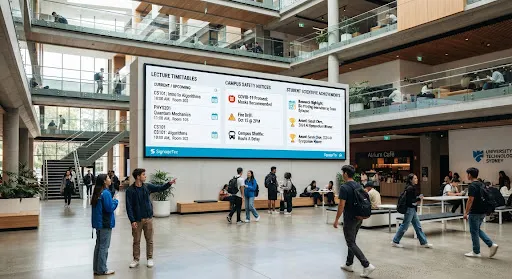
How is digital signage used in schools and universities?
Schools, colleges and universities use digital signage to share notices, events, timetables, achievements and wayfinding, and to broadcast urgent messages across campus. Screens are managed from cloud software, so different departments can manage their own screens while central teams can override every screen in an emergency.
Campus uses
Notices and events
Replace notice boards with screens that stay current.
Timetables
Room changes and schedules where students need them.
Emergency alerts
Push urgent messages to every screen at once.
Celebrating success
Show achievements, sports results and student work.
Built for campuses
Department permissions
Let each department manage its own screens.
Override messages
Central teams can take over every screen in an emergency.
Scheduling
Term-time, exam and open-day content on a timetable.
Video walls
Atrium and reception displays that make an impact.
Wayfinding
Help visitors and new students find their way.
One dashboard
Manage every building from a browser.
Planning a campus rollout
- 1Map high-traffic areas: entrances, corridors, canteens and receptions.
- 2Agree who manages which screens, and who can send emergency messages.
- 3Plan network access for screens with your IT team.
- 4Start with one building, then expand.
How we deliver your project
Step 1
Free consultation
Tell us about your site and goals. We recommend screens, software and set-up to suit your budget.
Step 2
Supply
Commercial displays, mounts and media players, specified for your location.
Step 3
Installation
Fitting, connection and testing, arranged around your opening hours.
Step 4
Content and support
We help set up your first content in the cloud software and support you afterwards.
Frequently asked questions
Can we send an emergency alert to every screen?
Yes. Authorised users can push an urgent message to all screens at once. Our campus alerts guide explains how to plan it.
Can departments manage their own screens?
Yes. User permissions let departments manage their own screens without affecting others.
Will it work on our school network?
Screens need internet access. We work with your IT team on network and security requirements.
Digital signage for other sectors
Get a quote for education
Tell us about your site and what you want your screens to do. Our London team will recommend the right displays, software and installation.