
Touch Screen Kiosks for Self-Service, Wayfinding and Feedback
Let customers help themselves. Our touch screen kiosks run self-service, check-in, wayfinding, product browsing and customer feedback, in freestanding, wall-mounted and desktop formats.
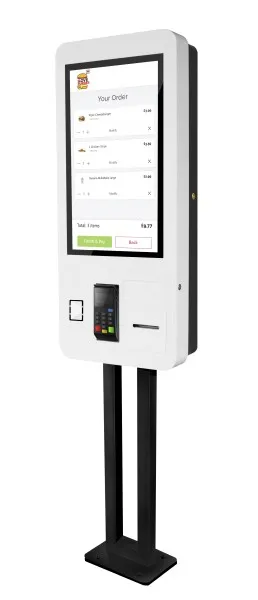
What is a touch screen kiosk?
A touch screen kiosk is an interactive screen in a freestanding, wall-mounted or desktop case that customers or visitors use themselves. It runs an app or web page for tasks such as checking in, finding their way, browsing products or leaving feedback. Kiosks usually run Android or Windows and are managed remotely.
Kiosk uses
Customer feedback
Collect quick ratings and comments while the experience is fresh.
Wayfinding
Interactive maps and directories for large buildings and campuses.
Check-in and visitor sign-in
Let visitors and patients sign in without queuing.
Product browsing
Extend your range with an endless aisle in store.
Kiosk features
Responsive multi-touch
Projected capacitive (PCAP) touch that feels like a smartphone.
Android or Windows
Choose the platform that suits your app or software.
Freestanding, wall or desk
Formats for entrances, corridors, counters and receptions.
Feedback surveys
Built-in customer feedback with results you can review online.
Accessible design
Plan screen height and layout so kiosks can be used by everyone.
Remote management
Update content and check kiosks from the cloud.
Choosing a kiosk
- 1Start with the task: feedback, check-in, wayfinding or browsing. This decides the software and size.
- 2Decide whether you need Android (simple, low-cost apps) or Windows (existing desktop software).
- 3Plan accessibility, including reach height for wheelchair users.
- 4Check whether you need extras such as a printer, card reader or camera.
How we deliver your project
Step 1
Free consultation
Tell us about your site and goals. We recommend screens, software and set-up to suit your budget.
Step 2
Supply
Commercial displays, mounts and media players, specified for your location.
Step 3
Installation
Fitting, connection and testing, arranged around your opening hours.
Step 4
Content and support
We help set up your first content in the cloud software and support you afterwards.
Frequently asked questions
Can a kiosk run our own software?
Usually, yes. Windows kiosks can run most desktop software and Android kiosks run Android apps and web apps. Tell us what you need to run and we will recommend a model.
How do customer feedback kiosks work?
The kiosk shows a short survey, such as a rating and an optional comment. Responses are collected in the cloud so you can see results by site and over time.
Are touch screens hygienic?
Kiosk glass can be cleaned with suitable screen cleaners, and many sites place hand sanitiser nearby. Ask us about cleaning guidance for your model.
Get a quote for touch screen kiosks
Tell us about your site and what you want your screens to do. Our London team will recommend the right displays, software and installation.