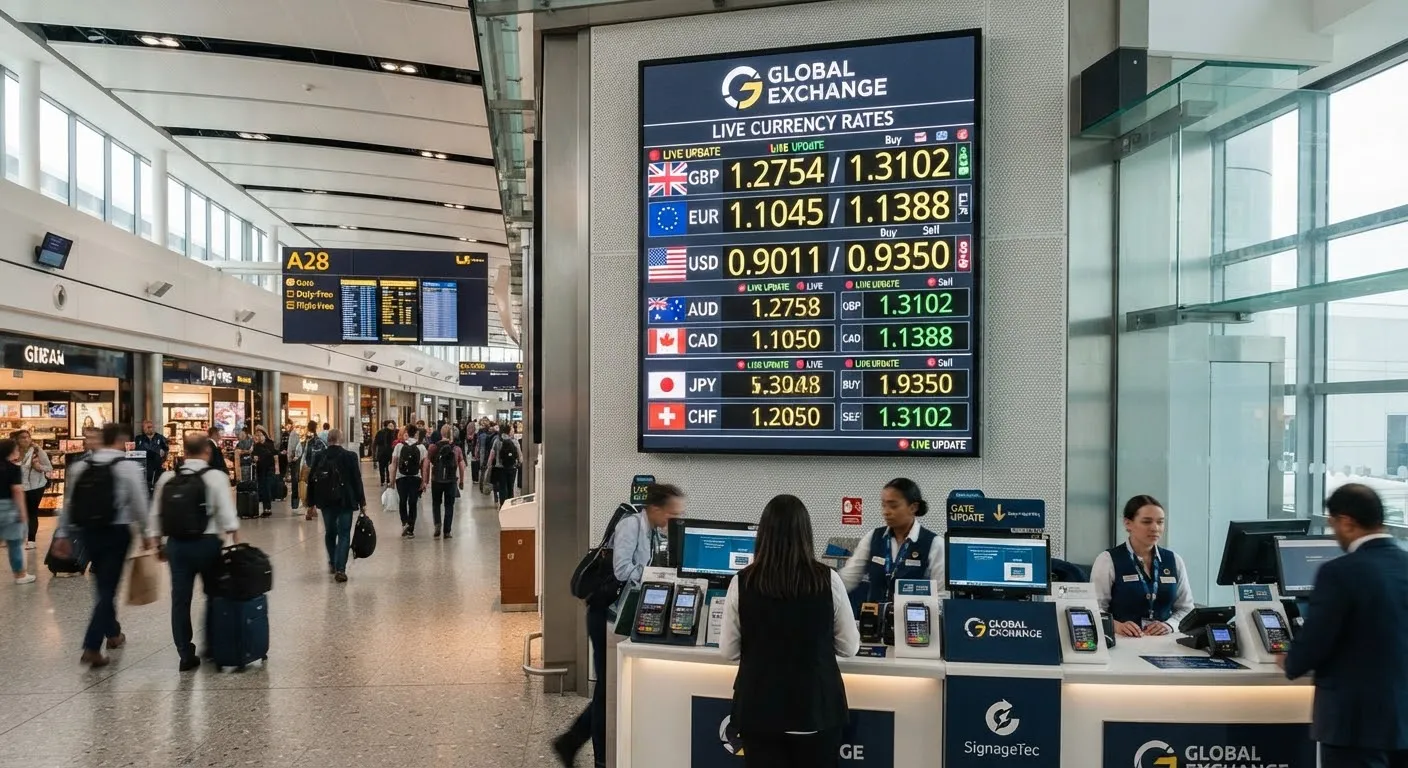
For a bureau de change, the rate board is the shop window. Customers compare it with the business next door and decide in seconds whether to walk in. Yet in many branches, rates are still typed in by hand or swapped on flip boards several times a day, which takes staff time and risks mistakes. Digital rate boards that update automatically solve both problems.
The problem with manual rate boards
- They take time. Staff need to update every currency whenever rates change, often several times a day.
- Mistakes cost money. A mistyped buy or sell rate can lead to customers being quoted the wrong price, or a branch losing margin until someone notices.
- Branches drift apart. When each branch updates its own board, customers can see different rates in different locations.
- They look dated. Flip boards and LED number panels limit what you can show and do little to promote your services.
How automated rate displays work
A digital rate board is a commercial display, usually in the window or behind the counter, that shows your rates as part of a designed layout. Instead of typing the numbers on each screen, the signage software reads them from a single source:
- Your rate system or spreadsheet. Many businesses already set rates centrally. The signage software can read them from a file, spreadsheet or web feed that your system produces.
- A data feed. The software can connect to a feed that publishes your rates and refresh the screens automatically.
When head office changes a rate, every connected screen updates without anyone in the branch touching it. You can also show the time the rates were last updated so customers know they are current.
Things to plan for
Approval and control
Decide who sets the rates and how changes are approved. Most businesses want one person or team to own the rates, with branches unable to change them locally.
Offline fallback
Internet connections occasionally drop. A good system keeps showing the last rates it received rather than going blank, and you should decide what you want to happen if rates become too old, such as showing a “please ask for today’s rates” message.
Readability
Customers read rate boards from the pavement, often in bright daylight. Use large numbers, clear currency codes and flags, and strong contrast. For window screens, choose a high-brightness display so the rates stay readable in the sun.
Compliance
Make sure your displayed rates match what customers are actually charged, including any commission or fees, and that your messaging follows the rules that apply to your business.
More than just rates
Once your rate board is digital, the same screen can do more:
- Promote travel money services, pre-order or click-and-collect.
- Rotate rates with short promotional messages.
- Show opening hours or notices when the branch is closed.
- Advertise other services such as money transfers.
Keep the rates as the main focus, though. Customers stop for the rates first.
Rolling out across branches
With a cloud CMS, you can group screens by branch or region, use one approved layout for every location and check from head office that every screen is online. New branches can be added to the same system and receive the same rates and layout from day one.
Getting started
SignageTec supplies rate boards and window displays for currency exchanges, banks and other financial businesses. We can supply the screens and software, design your rate board and help connect it to your rate source. Learn more about our work in financial services, or talk to us about your branches.